Seismic
/app/seismic
Upload SEG-Y volumes and horizon exports, run SpeQ-AVO on a partial-stack group, and view any converted volume as sections or as a 3D cube. The uploaded volumes and the horizons imported against them are what a SpeQ-AVO or Inversion-AVO run works over, and a finished SpeQ-AVO run appears here as a further volume to view alongside its input.
Upload
Pick the volumes and horizon files to upload and say how each volume is organised.
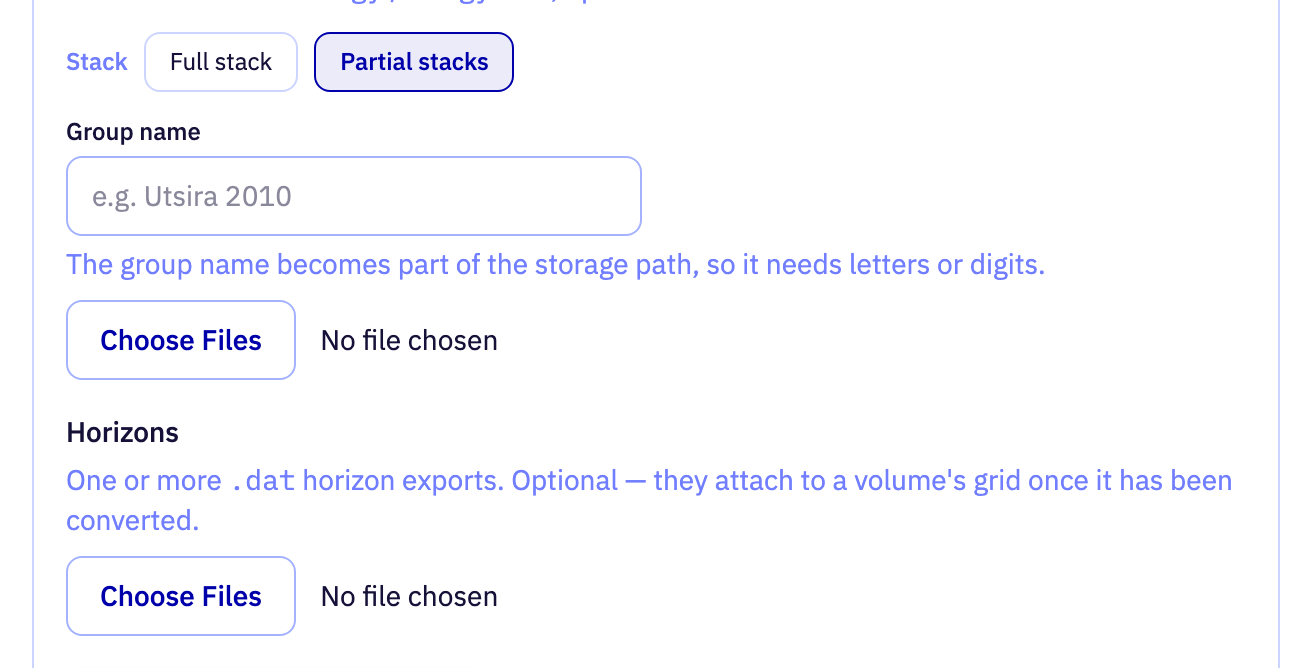
| Field | Purpose | Range | Default |
|---|---|---|---|
| Stack | Whether the volume is a full stack or one member of a partial-stack group. A partial stack needs a group name and a label per file. | — | Partial stacks |
| Group name | Name of the partial-stack group the volumes belong to. Volumes uploaded under the same group can be inverted together. | 1 to 80 characters | — |
| SEG-Y volumes | The SEG-Y files to upload. Each file is converted to a browsable volume once the upload completes. | — | — |
| Horizon files | Horizon exports to upload alongside the volumes. They can be imported onto a volume's grid after it has been converted. | — | — |
| Stack label | This file's label within its partial-stack group, such as near, mid or far, or an angle range. Labels must be unique within the group. | up to 40 characters lowercase letters and digits, with single hyphens between words | near |
| Vertical axis domain | Whether the vertical axis of this file is time or depth. Leave it unknown to let the converter read the domain from the file. | — | Unknown |
Limits are the API's unless marked app. The app may offer a narrower range.
Partial-stack group run
Run SpeQ-AVO on the converted members of a partial-stack group, windowed around a horizon.
| Field | Purpose | Range | Default |
|---|---|---|---|
| stack labels | Which stacks of the group take part in the run. Unticking a stack leaves it out of the merged result. | up to 40 characters, at least 1 value lowercase letters and digits, with single hyphens between words | — |
| horizon id | The horizon the run is windowed around. Only samples within the margin of this surface are inverted. | at least 1 character | — |
| margin ms | Half-window either side of the horizon that the run covers. A wider margin includes more of the trace above and below the surface. | 1 to 2000 ms | — |
Limits are the API's unless marked app. The app may offer a narrower range.
Viewer
Choose which volume the viewer reads.
| Field | Purpose | Range | Default |
|---|---|---|---|
| slice-stack | Which stack of a group SpeQ-AVO result to display. Shown only when the store holds more than one stack. | up to 40 characters lowercase letters and digits, with single hyphens between words | — |
| array | Which sparse-spike coefficient volume of a SpeQ-AVO result to display: positive, negative or zero coefficients. | — | — |
Limits are the API's unless marked app. The app may offer a narrower range.
Sections
Step through the volume one inline or crossline at a time.

| Field | Purpose | Range | Default |
|---|---|---|---|
| Slice dimension | Whether the section is cut along an inline or a crossline. | — | Inline |
| Inline 1720 (1/269) | Position of the section along the chosen axis. Release the slider to load that section. | 0 to 268app digits only | 0 |
Limits are the API's unless marked app. The app may offer a narrower range.
3D volume
Three planes through the volume, with an optional horizon surface, drawn as a cube.

| Field | Purpose | Range | Default |
|---|---|---|---|
| inline 1720 … | Position of the inline plane through the cube. Release the slider to load that plane. | 0 to 268app digits only | 0 |
| crossline 898 … | Position of the crossline plane through the cube. Release the slider to load that plane. | 0 to 560app digits only | 0 |
| time 1000 | Position of the horizontal plane through the cube, by sample along the vertical axis. Release the slider to load that plane. | 0 to 1000app digits only | 500 |
| Show | Shows or hides one of the three planes. Hiding a plane reveals what sits behind it. | — | inline, crossline, time |
| show-horizon | Shows or hides the selected horizon surface. Hiding it exposes the reflectors it is meant to be checked against. | — | — |
| show-inset | Shows or hides the inset plotting the amplitude distribution along the horizon. | — | — |
| Vertical exaggeration | Stretches or squashes the vertical axis of the cube relative to the bin spacing. Higher values make gentle structure easier to see. | -2 to 2app | -1 |
Limits are the API's unless marked app. The app may offer a narrower range.
Display
Gain, clipping and overlay controls for the section image.

| Field | Purpose | Range | Default |
|---|---|---|---|
| Gain | How trace amplitudes are balanced before display: none, a time-power gain, automatic gain control, per-trace normalisation, a fixed scale or a bias. | — | None |
| p | Exponent of the time-power gain. Higher values boost late arrivals more strongly. | 0 to 5app | 2 |
| win | Length of the automatic gain control window in seconds. Shorter windows equalise amplitudes more aggressively. | 0.01 to 2 sapp | 0.5 s |
| Gain | Factor every amplitude is multiplied by before display. | — | 2 |
| Gain | Constant added to every amplitude before display, shifting the image towards positive or negative. | — | 0 |
| Max Amplitude | Amplitude at which the colour scale saturates. Lower values bring out weak reflectors; higher values preserve the strongest events. | — | — |
| Clip | Percentile of the amplitude distribution used to set the clip. Lower percentiles clip more of the strongest samples. | 90 to 100 %app | 99 % |
| coefficient-reveal | Drag the handle across the section to reveal the SpeQ-AVO coefficient overlay on top of the amplitude image. | — | — |
Limits are the API's unless marked app. The app may offer a narrower range.
Horizon import
Turn an uploaded horizon export into a horizon on this volume's grid.
| Field | Purpose | Range | Default |
|---|---|---|---|
| source path | The uploaded horizon export to import. | at least 1 character a horizon file uploaded on the Upload tab | — |
| name | Display name of the horizon. It is seeded from the file name and can be edited. | 1 to 100 characters | — |
Limits are the API's unless marked app. The app may offer a narrower range.